How to Spot a Scam Text or Email in Australia (2026 Guide)
Updated: 20 Feb 2026 • Safety & Confidence
Scam texts and emails are increasing across Australia — especially targeting older adults, NDIS participants, and small businesses.
At Troubleshoot IT, we regularly help people in Darwin and across the Northern Territory who have received suspicious messages pretending to be:
- Banks
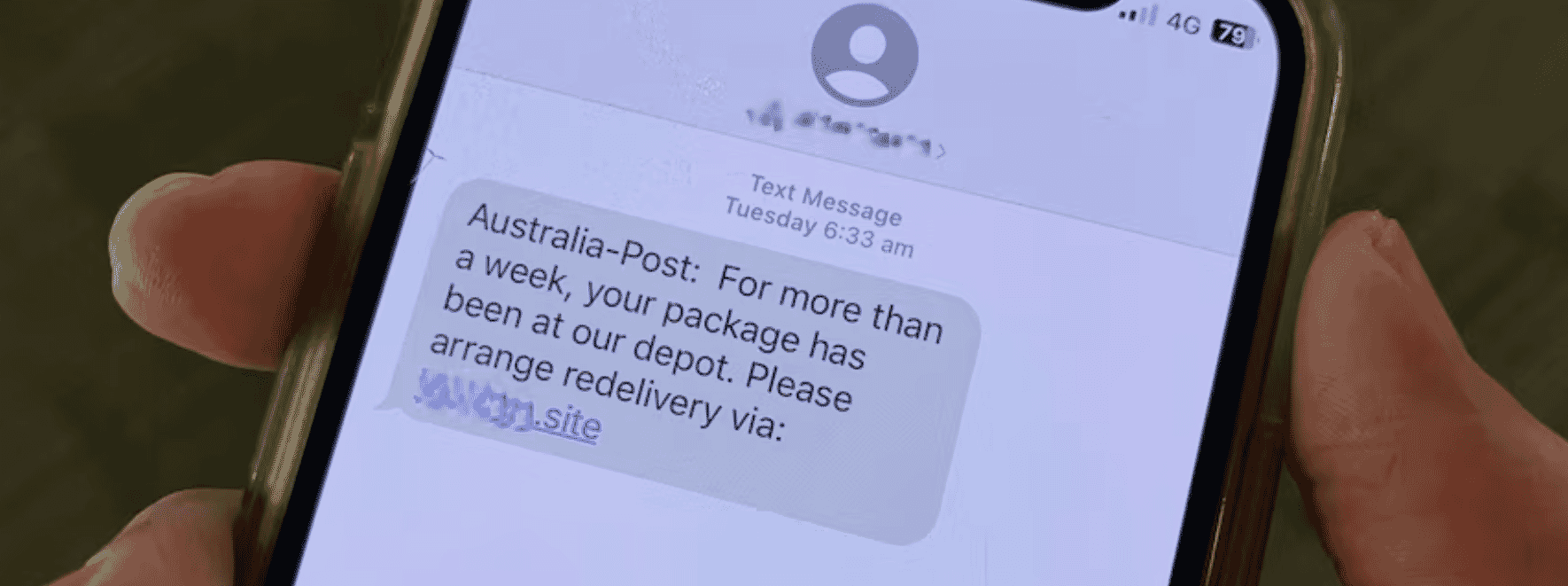
- Australia Post
- MyGov
- NDIS
- Telstra
- Microsoft
- Or even family members
Here’s how to recognise a scam, and what to do next.
1. It Creates Urgency or Fear
Scam messages often say things like:
- “Your account will be suspended today.”
- “Payment failed — click immediately.”
- “You owe money.”
- “Suspicious activity detected.”
- “Your parcel cannot be delivered.”
They rely on panic.
Legitimate organisations rarely demand immediate action via random text.
2. The Link Looks Suspicious
Hover over links on a computer. On a phone, don’t tap - instead:
- Check the spelling carefully.
- Look for strange web addresses.
For example:
- auspost-secure-check.com
- mygov-verify-login.net
- nd1s-support.com
Official organisations use secure domains like:
- Australia Post → auspost.com.au
- Services Australia → servicesaustralia.gov.au
- National Disability Insurance Scheme → ndis.gov.au
If the link doesn’t match the official domain exactly — it’s likely fake.
3. Poor Grammar or Strange Wording
Many scam emails:
- Use awkward language
- Contain spelling mistakes
- Address you as “Dear Customer”
- Don’t include your real name
Government agencies and banks will usually use your correct name.
4. They Ask for Sensitive Information
Red flag requests:
- Bank details
- Credit card numbers
- Medicare number
- NDIS number
- Passwords
- One-time verification codes
No legitimate organisation will ask for your password via text or email.
5. Unexpected Messages from “Family”
We are seeing more “Hi Mum/Dad” scams in Australia.
Example:
“Hi Mum, I lost my phone. This is my new number. Can you send money urgently?”
Before responding:
- Call the person on their original number.
- Ask a personal question only they would know.
What To Do If You Receive a Scam Message
- Do NOT click the link
- Do NOT reply
- Delete the message
If unsure:
- Open a browser.
- Manually type the official website.
- Log in from there.
You can also check warnings on:
Scamwatch - https://www.scamwatch.gov.au/
What If You Already Clicked?
Don’t panic — act quickly.
If you entered bank details:
- Contact your bank immediately.
If you entered passwords:
- Change them straight away.
- Turn on two-factor authentication (2FA).
If it involved NDIS or MyGov:
- Contact the official agency directly through their website.
Why Older Australians Are Being Targeted
Scammers specifically target:
- Retirees
- People with disability
- Small NDIS providers
- People less familiar with technology
They assume:
- You may trust authority figures.
- You may respond quickly to urgent requests.
- You may not check web addresses carefully.
That’s why education is powerful.
Cyber Safety Support in Darwin & NT
If you’re in Darwin, Palmerston, Katherine, or elsewhere in the Northern Territory and you:
- Feel unsure about a message
- Have clicked something suspicious
- Want help securing your phone or computer
Troubleshoot IT can help.
We specialise in:
- Scam prevention education
- Device security checks
- Backup & recovery setup
- Training for older Australians and people with disability
Before You Click, Pause and Ask:
- Do I know who sent this?
- Was I expecting this message?
- Is the web address spelled correctly?
- Is this trying to scare or rush me?
- Would I feel comfortable showing this to someone I trust?
If you answer “no” or feel unsure — stop.
Free Download: Home Cyber Safety Checklist
We’re creating a printable cyber safety checklist for older Australians.
If you’d like a copy, contact us through our website and we’ll send it to you.
Final Advice
If something feels urgent, scary, or “too good to be true” — pause.
Scammers rely on speed.
Cyber safety relies on slowing down.